
Understanding what technology a website uses can be valuable for many reasons — competitor research, technical audits, inspiration, or even sales intelligence.
Website technology checker tools help you identify CMS platforms, frameworks, analytics tools, hosting providers, and security technologies behind any website. However, not all tools are built the same, and the “best” option depends on how you plan to use the information.
In this guide, we compare the best website technology checker tools, highlight their strengths and limitations, and help you choose the right one based on your needs.
What is a website technology checker?
A website technology checker is a tool that analyzes publicly detectable signals on a website to identify the technologies used to build and run it.
These tools typically detect:
- Frontend frameworks and libraries
- Backend languages and platforms
- Content management systems (CMS)
- Analytics and tracking tools
- Hosting and security technologies
They are commonly used by developers, founders, marketers, agencies, and analysts. Here you can know more on how to check what technology a website uses.
How we compared these tools
To keep this comparison useful and fair, we evaluated each tool based on:
- Accuracy and coverage of detected technologies
- Clarity of results and explanations
- Ease of use
- Comparison and analysis capabilities
- Practical value for real decision-making
This is not about which tool detects the most technologies, but which helps users understand them best.
1. TrueTechFinder
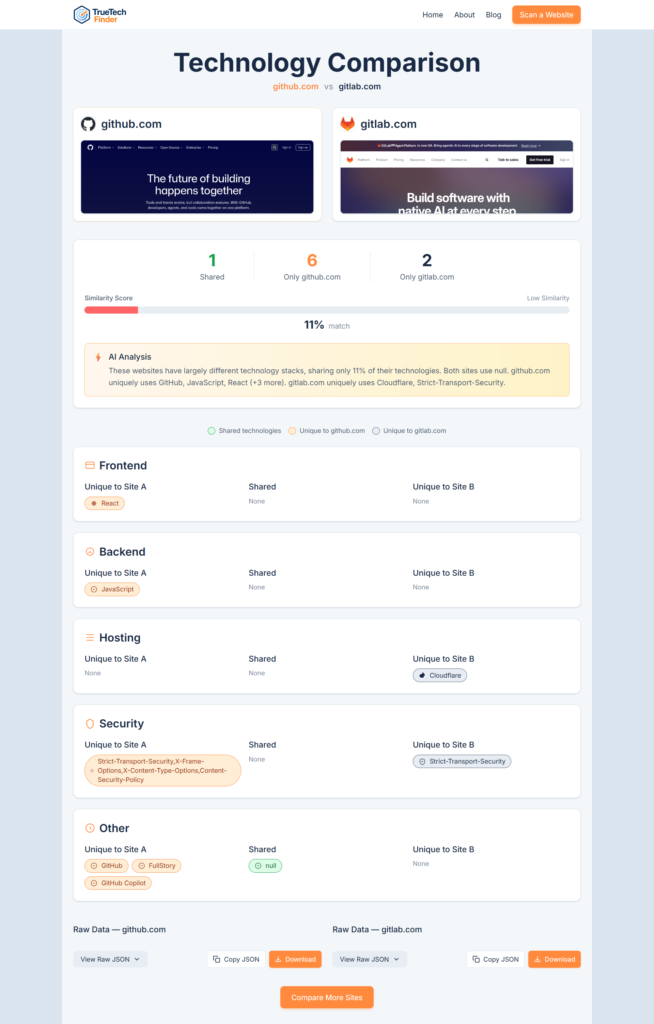
Best for: Clear insights and competitor comparison
TrueTechFinder is an AI-powered website technology checker focused on clarity and understanding, rather than overwhelming users with raw data.
Instead of presenting long technology lists, it explains what the detected stack means and how it compares to other websites. This makes it especially useful for founders, agencies, and marketers who need actionable insight.
Key strengths
- Detects frontend, backend, analytics, hosting, and security technologies
- AI-powered, human-readable insights
- Side-by-side website technology comparison
- Clean, beginner-friendly interface
- Free to use with no setup
Limitations
- Less focused on historical or enterprise-level datasets
TrueTechFinder is ideal if you want to analyze and compare technology stacks, not just identify them.
2. BuiltWith
Best for: Large datasets and enterprise research
BuiltWith is one of the most established website technology checker tools. It offers extensive data and is often used for large-scale research, lead generation, and enterprise analysis.
Key strengths
- Very large technology database
- Industry and market-level insights
- Popular among enterprise teams
Limitations
- Data-heavy interface can be overwhelming
- Limited explanation of what the data means
- Many features require paid plans
BuiltWith works best when you need raw data at scale, rather than clarity for individual websites.
You can also check Best BuiltWith alternatives
3. Wappalyzer
Best for: Quick checks and browser-based detection
Wappalyzer is widely used due to its browser extension, which allows users to instantly see detected technologies while visiting a website.
Key strengths
- Fast, easy-to-use browser extension
- Covers a wide range of technologies
- Good for quick inspections
Limitations
- Results are mostly raw lists
- Limited context or analysis
- Not designed for deep comparison
Wappalyzer is useful for quick lookups, but less helpful for deeper analysis.
4. WhatRuns
Best for: Lightweight and simple usage
WhatRuns is a lightweight browser-based website technology checker with a focus on simplicity.
Key strengths
- Simple and easy to use
- Minimal interface
- Good for casual checks
Limitations
- Limited depth and coverage
- Little to no insight beyond detection
WhatRuns is suitable for basic use, but not ideal for professional analysis.
5. SimilarTech
Best for: Market-level and sales intelligence
SimilarTech focuses more on technology market intelligence than individual website analysis. It is often used by sales and enterprise teams.
Key strengths
- Market adoption insights
- Technology trend analysis
- Useful for lead research
Limitations
- Less practical for single-site analysis
- Higher complexity and cost
SimilarTech is better viewed as a complementary tool, rather than a direct alternative.
How to choose the right website technology checker?
The best tool depends on what you’re trying to achieve.
Choose a clarity-focused tool if:
- You want to understand why technologies are used
- You’re comparing competitors or vendors
- You need actionable insights
Choose a data-heavy tool if:
- You need large datasets
- You’re doing market research or lead generation
- You’re comfortable interpreting raw data
Check this article for more clarity: BuiltWith vs Wappalyzer vs TrueTechFinder
Final thoughts
Website technology checker tools are valuable — but only if the information they provide is easy to understand and act on.
Some tools focus on scale and datasets, while others focus on usability and insight. Choosing the right one depends on how you plan to use the results.
If your goal is to analyze, compare, and understand website technology stacks, tools that emphasize clarity and comparison often deliver more practical value.
👉 Try it yourself
Scan a website or compare two competitors to see how different technology stacks reveal real-world decisions.
Related Posts
- How Agencies Use Website Technology Scans to Win More Clients?
- Best Website Technology Checker Tools (Compared)
- Best BuiltWith Alternatives (Compared for Accuracy & Insights)
- How to Analyze Competitor Website Technology Stacks? (Step-by-Step Guide)
- BuiltWith vs Wappalyzer vs TrueTechFinder: Which Website Technology Checker Is Best?