
If you’ve ever tried to find out what technology a website uses, chances are you’ve come across BuiltWith or Wappalyzer.
They’re popular tools for website technology detection — but they’re not always easy to use, interpret, or act on.
In this guide, we’ll compare BuiltWith vs Wappalyzer vs TrueTechFinder to help you decide which website technology checker is best for your needs — whether you’re a founder, marketer, agency, or developer.
Why compare website technology lookup tools?
If you’re new to website technology analysis, start with our guide on how to check what technology a website uses before comparing tools.
Knowing a website’s technology stack helps you:
- Analyze competitors
- Audit client websites
- Discover analytics and marketing tools
- Understand how successful sites are built
- Make better product and infrastructure decisions
But not all tools present this information in the same way — and that difference matters.
Quick comparison overview
| Feature | BuiltWith | Wappalyzer | TrueTechFinder |
|---|---|---|---|
| Technology detection | ✅ Yes | ✅ Yes | ✅ Yes |
| CMS, hosting, analytics | ✅ | ✅ | ✅ |
| Side-by-side comparison | ⚠️ Limited | ⚠️ Limited | ✅ Built-in |
| AI-generated insights | ❌ No | ❌ No | ✅ Yes |
| Human-readable explanations | ❌ No | ❌ No | ✅ Yes |
| Beginner-friendly UI | ⚠️ | ⚠️ | ✅ |
| Free usage | ⚠️ Limited | ⚠️ Limited | ✅ Yes |
| Export options | ✅ | ✅ | ✅ |
Now let’s break each tool down in detail.
BuiltWith: Powerful data, overwhelming for most users
BuiltWith is one of the oldest and most widely known website technology lookup tools.
✅ What BuiltWith does well
- Massive technology database
- Detailed enterprise-level data
- Historical technology tracking
- Lead generation features
❌ Where BuiltWith falls short
- Overwhelming data output
- Little explanation of what the data means
- Steep learning curve for beginners
- Expensive pricing for advanced features
Best for:
- Large sales teams
- Enterprise-level research
- Users who already know what they’re looking for
For most founders or marketers, BuiltWith feels like too much raw data, not enough insight.
Wappalyzer: Quick detection, limited context
Wappalyzer is popular as a browser extension and lightweight scanning tool.
✅ What Wappalyzer does well
- Fast technology detection
- Simple browser extension
- Easy to use for quick checks
❌ Where Wappalyzer falls short
- Mostly raw lists of technologies
- Limited explanation or context
- Comparison features are basic
- Doesn’t help you interpret the stack
Best for:
- Quick spot checks
- Developers doing lightweight inspections
- Users who already understand tech stacks
Wappalyzer is fast, but it leaves users asking:
“Okay… now what?”
TrueTechFinder: Technology detection with AI-powered understanding
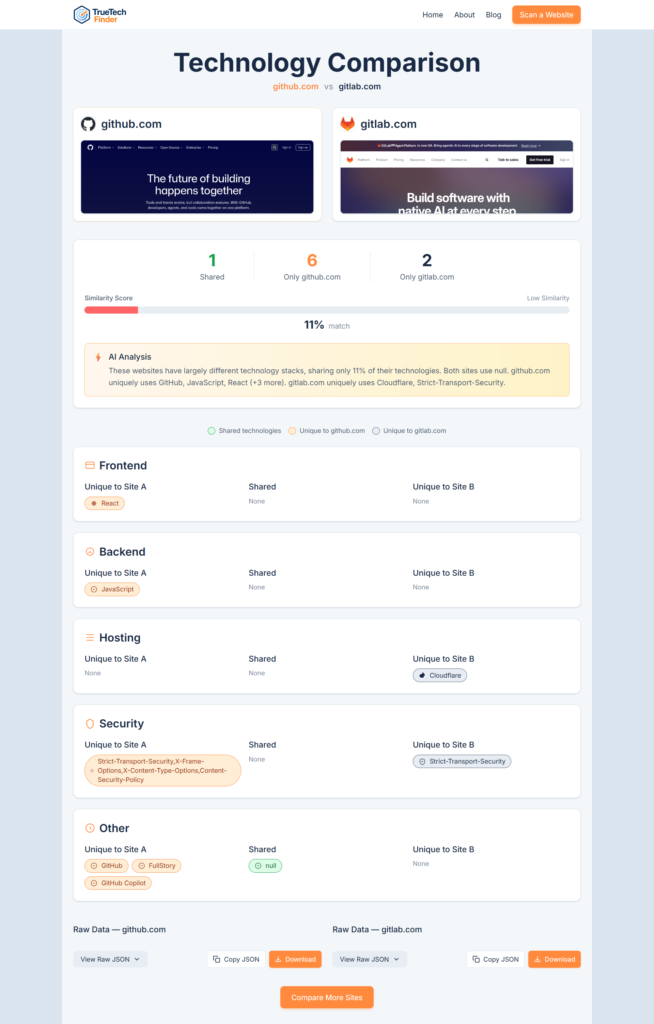
TrueTechFinder was built to solve the biggest problem with traditional tools: lack of clarity.
Instead of just showing raw technology lists, it focuses on explanation, comparison, and insight.
✅ What TrueTechFinder does well
- Detects CMS, hosting, analytics, frameworks, security tools
- Organizes technologies into clear categories
- Generates AI-powered, human-readable insights
- Built-in side-by-side comparison
- Clean, modern interface
- Free to use with no signup required
Where TrueTechFinder stands out
- Explains what the tech stack says about the website
- Highlights differences between competitors clearly
- Designed for non-technical users as well as developers
Best for:
- Founders researching competitors
- Agencies auditing client websites
- Marketers analyzing tracking and growth tools
- Anyone who wants insight, not just data
Try now: Find the technologies used in a website or compare technologies used on two websites: https://www.truetechfinder.com/
Which tool should you use?
Choose BuiltWith if:
- You need enterprise-level data
- You’re doing large-scale sales or lead research
- You’re comfortable navigating complex datasets
Choose Wappalyzer if:
- You want quick browser-based detection
- You only need basic tech lists
- You already understand the technologies
Choose TrueTechFinder if:
- You want clear explanations, not raw data
- You’re comparing competitors or client websites
- You want insights you can act on immediately
Why AI-powered insights matter
Traditional tools answer:
“What technologies does this website use?”
TrueTechFinder also answers:
“What does this technology stack tell you?”
That difference matters when making decisions about:
- Performance
- Security
- Marketing strategy
- Infrastructure choices
AI helps bridge the gap between data and understanding.
Also read: How to check what technology a website uses? (Complete Guide)
Final verdict
BuiltWith and Wappalyzer are solid tools — but they were designed for a different era.
If you want:
- Cleaner results
- Faster understanding
- Side-by-side comparisons
- Human-readable insights
Then TrueTechFinder is the more modern, practical choice.
Try it yourself
You can scan any website for free and see clear, AI-powered technology insights using TrueTechFinder.
Related Posts
- How Agencies Use Website Technology Scans to Win More Clients?
- Best Website Technology Checker Tools (Compared)
- Best BuiltWith Alternatives (Compared for Accuracy & Insights)
- How to Analyze Competitor Website Technology Stacks? (Step-by-Step Guide)
- BuiltWith vs Wappalyzer vs TrueTechFinder: Which Website Technology Checker Is Best?