
BuiltWith is one of the most popular tools for identifying the technologies behind a website. It’s widely used by developers, marketers, and agencies — but it’s not always the best fit for everyone.
Depending on your needs, you may want a tool that’s easier to understand, offers clearer insights, or focuses more on competitor analysis rather than raw data.
In this guide, we compare the best BuiltWith alternatives, explain where each tool excels, and help you choose the right option based on how you actually plan to use it.
Why look for a BuiltWith alternative?
BuiltWith is powerful, but users often look for alternatives because:
- The data can feel overwhelming or hard to interpret
- Reports focus more on listings than explanations
- Some features are locked behind paid plans
- It’s not always beginner-friendly
If your goal is not just to see technologies, but to understand what they mean, alternatives may be a better fit.
Visit this article to find more on how to check what technology a website uses?
What makes a good BuiltWith alternative?
Before comparing tools, it’s important to define what “better” means for you.
A strong BuiltWith alternative should ideally:
- Accurately detect website technologies
- Cover key categories (CMS, hosting, analytics, frameworks, security)
- Present information clearly
- Support competitor or comparative analysis
- Be useful for real decision-making, not just data collection
With that in mind, let’s look at the top options.
1. TrueTechFinder
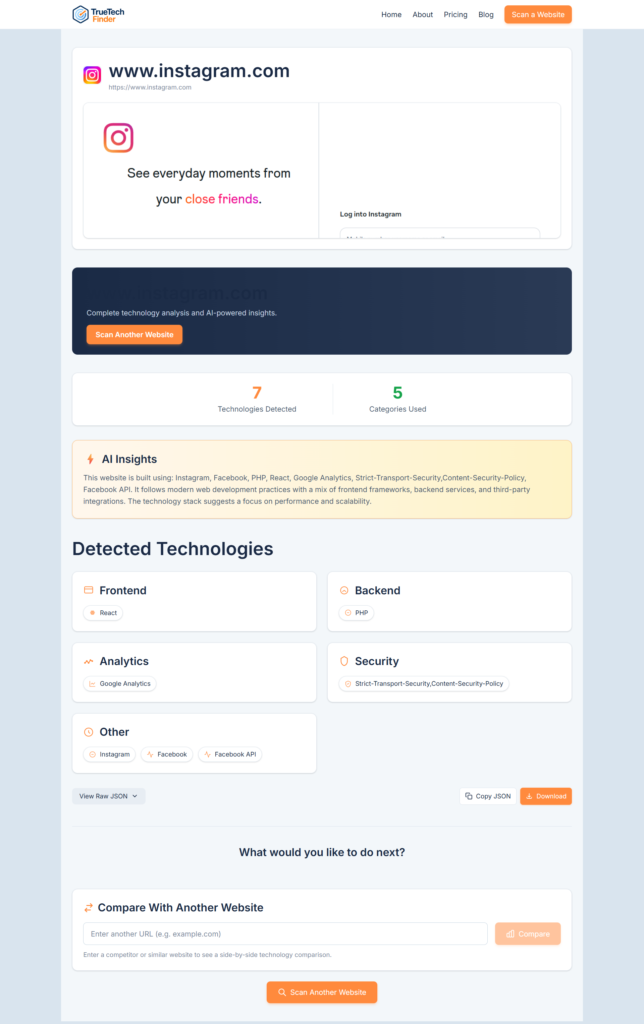
Best for: Clear insights and competitor analysis
TrueTechFinder is an AI-powered website technology lookup tool designed to make technology detection easier to understand.
Instead of showing long, raw lists of detected tools, it focuses on human-readable explanations and structured insights. This makes it especially useful for founders, marketers, and agencies who want clarity rather than technical noise.
Key strengths
- Detects CMS, hosting, analytics, frameworks, and security tools
- AI-powered explanations that explain what the stack means
- Side-by-side website comparison for competitor analysis
- Free to use with no setup required
Potential limitations
- More focused on insight and clarity than exhaustive historical data
TrueTechFinder is a strong BuiltWith alternative if your goal is to understand technology choices, not just catalog them. Visit TrueTechFinder to scan a website.
2. Wappalyzer
Best for: Quick technology detection and browser-based checks
Wappalyzer is one of the most commonly used BuiltWith alternatives. It’s especially popular due to its browser extension, which allows users to instantly see detected technologies while visiting a website.
Key strengths
- Fast detection via browser extension
- Supports a wide range of technologies
- Easy to use for quick checks
Potential limitations
- Results are mostly raw data with limited interpretation
- Less suited for structured competitor analysis
Wappalyzer works well for quick inspections, but may feel limited if you’re doing deeper research or comparisons.
3. SimilarTech
Best for: Market-level and enterprise insights
SimilarTech focuses more on technology market intelligence rather than individual website analysis. It’s often used by sales and enterprise teams to identify trends across industries.
Key strengths
- Market-level technology adoption insights
- Useful for lead generation and enterprise research
Potential limitations
- Less practical for single-site analysis
- More complex and expensive for casual users
SimilarTech is less of a direct BuiltWith replacement and more of a complementary enterprise tool.
4. WhatRuns
Best for: Lightweight and simple usage
WhatRuns is a browser-based technology detector similar to Wappalyzer, with a focus on simplicity.
Key strengths
- Easy to install and use
- Lightweight interface
Potential limitations
- Limited depth and coverage
- Minimal insights beyond detection
This is a decent option for basic checks, but not ideal for professional research or audits.
BuiltWith vs alternatives: which should you choose?
The right tool depends on how you plan to use the data. You can also check this useful article to compare BuiltWith alternatives: BuiltWith vs Wappalyzer vs TrueTechFinder
Choose BuiltWith if:
- You need large-scale datasets
- You’re comfortable interpreting raw data
- You rely on BuiltWith’s ecosystem
Choose an alternative if:
- You want clearer explanations
- You’re doing competitor or client analysis
- You prefer usability over data volume
For many users, especially founders and agencies, tools that focus on clarity and insight are often more effective than raw detection alone.
How to choose the right BuiltWith alternative
Ask yourself:
- Do I need raw data or actionable insights?
- Am I analyzing one site or comparing competitors?
- Is this for technical research or business decisions?
Your answers will point you toward the right tool.
Final thoughts
BuiltWith remains a strong tool, but it’s not the only option — and it’s not always the best one.
If your goal is to understand website technology stacks, uncover competitor patterns, and make informed decisions, exploring BuiltWith alternatives can be a smart move.
The best tool is the one that matches how you think and work, not just how much data it provides.
👉 Try it yourself
Scan and compare websites to see how different technology stacks are built and what they reveal about real-world business decisions.