
Understanding what technology your competitors use can give you a serious advantage.
Whether you’re a founder researching successful products, an agency preparing a client pitch, or a marketer trying to understand how competitors track and grow traffic — analyzing competitor website technology stacks helps you make better, faster decisions.
In this guide, you’ll learn how to analyze competitor websites step by step, what to look for, and how to turn raw technology data into real insights.
Why analyzing competitor technology stacks matters?
Looking at competitor technology stacks helps you:
- See which tools and platforms are working in your market
- Understand how competitors handle performance, analytics, and security
- Avoid reinventing the wheel
- Validate your own technical and marketing decisions
- Identify gaps or opportunities competitors are missing
Instead of guessing, you learn from what’s already proven to work.
If you’re new to technology analysis, start with our guide on how to check what technology a website uses.
What is a competitor website technology stack?
A competitor’s technology stack typically includes:
- CMS (WordPress, Webflow, Shopify, custom builds)
- Hosting & CDN (Cloudflare, AWS, Vercel, etc.)
- JavaScript frameworks (React, Vue, Next.js)
- Analytics & tracking (Google Analytics, Meta Pixel, other tools)
- Marketing tools (A/B testing, chat, email tools)
- Security technologies (SSL, headers, WAFs)
- E-commerce & payments (Stripe, WooCommerce, Shopify)
Each of these tells you something about how the business operates.
Step 1: Identify the right competitors
Before scanning anything, be clear about who you’re analyzing.
Good competitors to analyze:
- Direct competitors in your niche
- Market leaders or category winners
- Fast-growing startups in your space
- Companies targeting the same audience
Avoid analyzing:
- Random large companies (unless relevant)
- Heavily custom enterprise platforms (less actionable)
Start with 3–5 competitors for best results.
Step 2: Scan competitor websites for technology detection
The fastest way to analyze competitor stacks is to use a website technology scanner.
Instead of manually inspecting code or guessing, you can scan any website to detect:
- CMS and frameworks
- Hosting and CDN
- Analytics and tracking tools
- Security and infrastructure signals
This gives you a structured overview of what powers each competitor site.
You can quickly scan competitor websites to see their technology stack in seconds.
Step 3: Compare multiple competitors side-by-side
Looking at one competitor in isolation is useful — but the real insights come from comparison.
When you compare competitors side-by-side, patterns emerge:
- Which CMS appears most often?
- Are most competitors using a CDN?
- Which analytics tools are common?
- Who invests more in security or performance?
Side-by-side comparison helps you separate industry standards from outliers.
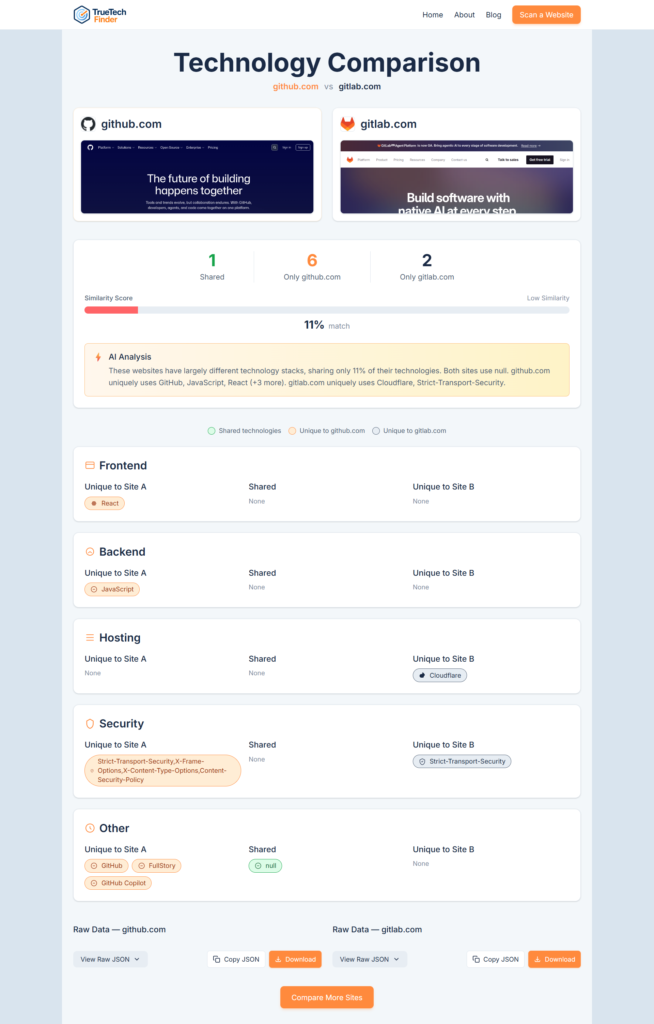
Use side-by-side comparison to compare competitor websites and spot patterns across your market.
Step 4: Interpret what the technology choices mean
This is where many people stop — but it’s where the real value begins.
Ask questions like:
CMS & framework choices
- Is the site optimized for content, e-commerce, or SaaS?
- Does the CMS suggest speed, flexibility, or simplicity?
Hosting & performance
- Are competitors investing in performance and scalability?
- Is a CDN being used consistently?
Analytics & marketing tools
- Are competitors heavily tracking users?
- Are they focused on paid growth, SEO, or retention?
Security stack
- Are security headers and protections present?
- Is the site built for trust and compliance?
Technology choices often reflect business priorities.
Step 5: Turn insights into action
Competitor technology analysis should lead to decisions, not just curiosity.
For founders
- Validate platform and infrastructure choices
- Understand how mature competitors operate
- Avoid over-engineering early
For agencies
- Prepare smarter audits and pitches
- Identify upsell opportunities
- Demonstrate competitive gaps to clients
For marketers
- Discover tracking, analytics, and growth tools
- Reverse-engineer acquisition strategies
- Improve measurement and attribution
The goal isn’t copying — it’s learning intelligently.
We also compare popular tools in our detailed breakdown of BuiltWith vs Wappalyzer vs TrueTechFinder.
Common mistakes to avoid
- ❌ Blindly copying competitor stacks
- ❌ Focusing only on tools, not strategy
- ❌ Ignoring business context
- ❌ Over-analyzing irrelevant competitors
Technology should inform decisions, not dictate them.
How TrueTechFinder helps with competitor analysis?
TrueTechFinder simplifies competitor website analysis by:
- Detecting technologies automatically
- Organizing results into clear categories
- Offering side-by-side comparison
- Providing AI-powered explanations instead of raw lists
This makes it easier to understand why competitors made certain choices — not just what they use.
Final thoughts
Analyzing competitor website technology stacks is one of the most underused advantages in digital strategy.
With the right approach, you can:
- Learn faster
- Avoid costly mistakes
- Make confident technical and marketing decisions
The key is combining technology detection with interpretation and context.
Try it yourself
Scan and compare competitor websites using TrueTechFinder to uncover real, actionable technology insights in minutes.
Related Posts:
- How Agencies Use Website Technology Scans to Win More Clients?
- Best Website Technology Checker Tools (Compared)
- Best BuiltWith Alternatives (Compared for Accuracy & Insights)
- How to Analyze Competitor Website Technology Stacks? (Step-by-Step Guide)
- BuiltWith vs Wappalyzer vs TrueTechFinder: Which Website Technology Checker Is Best?