
Have you ever visited a website and wondered how it was built?
Whether you’re researching competitors, auditing a client’s website, or deciding which tools to use for your own project, knowing a website’s technology stack gives you a serious advantage.
Maybe you’re curious what CMS it uses.
Or which analytics tools are installed.
Or how competitors built such a fast, polished website.
Checking what technology a website uses is one of the most valuable skills for founders, marketers, agencies, and developers — and in this guide, you’ll learn exactly how to do it, from manual methods to modern AI-powered tools.
Why knowing a website’s technology stack matters
Understanding a website’s technology stack helps you:
- Analyze competitors and market leaders
- Reverse-engineer successful setups
- Improve your own website’s performance, SEO, and security
- Pitch better solutions to clients
- Decide which tools and platforms are worth using
Instead of guessing, you can base decisions on real data.What is a website technology stack?
A website’s technology stack typically includes:
- CMS (WordPress, Webflow, Shopify, etc.)
- Hosting & CDN (Cloudflare, AWS, Vercel)
- JavaScript frameworks (React, Vue, Next.js)
- Analytics & tracking (Google Analytics, Meta Pixel)
- Marketing tools (email, chat, A/B testing)
- Security technologies (SSL, headers, WAF)
- E-commerce platforms (WooCommerce, Magento, Stripe)
A good tech lookup tool should identify most or all of these.
Try it yourself:
Scan any website and see its full technology stack with clear, AI-powered explanations using TrueTechFinder.
Manual ways to check what technology a website uses (and their limits)
1. View Page Source
Right-click → “View Page Source” can reveal:
- Meta tags
- Script names
- CMS hints
Limitations:
- Time-consuming
- Hard to interpret
- Misses server-side tech
2. Browser Developer Tools
Using Chrome DevTools → Network / Sources tabs, you can inspect:
- JavaScript frameworks
- Loaded scripts
- API calls
Limitations:
- Requires technical expertise
- No summary or categorization
- Easy to miss key tools
3. BuiltWith & Wappalyzer
These are popular tools for website technology lookup.
Pros:
- Quick results
- Large databases
Cons:
- Mostly raw data
- Overwhelming lists
- Limited explanation of what it means
This is where modern tools improve the experience.
If you’re deciding between popular tools, you can also read our detailed comparison of BuiltWith vs Wappalyzer vs TrueTechFinder to see which option works best for different use cases.
The easiest way: use an AI-powered website technology checker
Instead of manually inspecting code or reading long tech lists, you can use an AI-powered tool that:
- Detects technologies automatically
- Categorizes them clearly
- Explains what the stack says about the website
That’s exactly what TrueTechFinder does.
How to check a website’s technology using TrueTechFinder (step-by-step)
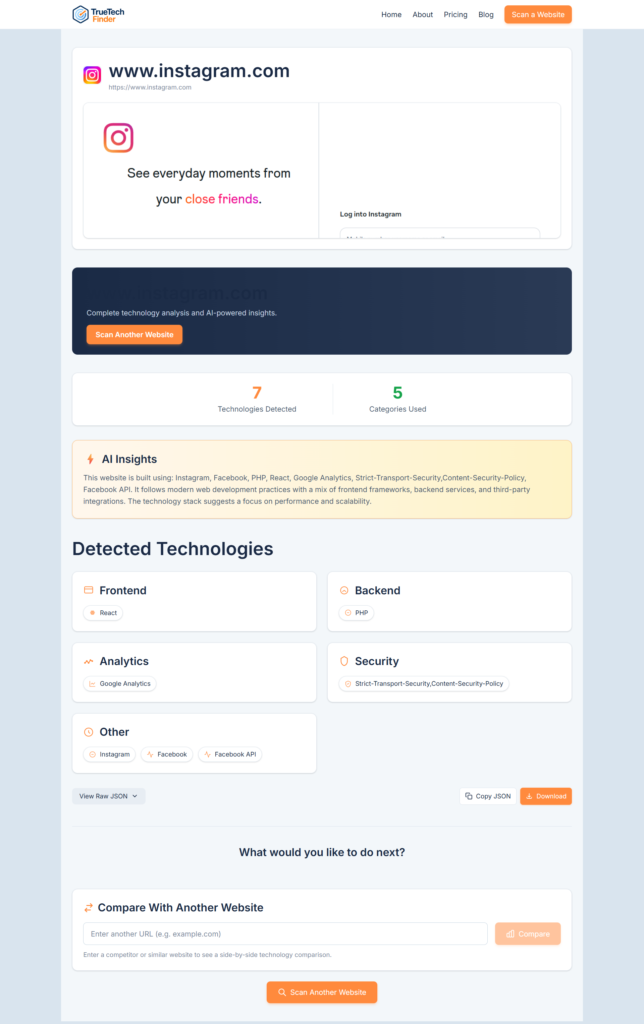
You can instantly scan any website and see its full technology stack using TrueTechFinder. Follow the below step-by-step process.
Step 1: Open the scanner
Go to the TrueTechFinder website to open the website technology scanner, or directly use this link: https://www.truetechfinder.com/
Step 2: Enter the website URL
Paste any website URL (for example: a competitor, SaaS product, or client site).
Step 3: Run the scan
TrueTechFinder instantly analyzes:
- HTML
- Headers
- Scripts
- Framework signals
Step 4: View detected technologies
You’ll see structured categories such as:
- CMS
- Hosting / CDN
- Analytics
- Frameworks
- Security
Everything is grouped and easy to understand.
Step 5: Read AI-powered insights
Instead of raw data, you get a human-readable explanation, including:
- What the website is likely built for
- Performance and security observations
- Marketing and growth stack insights
This is the key difference from traditional tools.
You can also compare two websites side-by-side to see differences in CMS, hosting, analytics, and infrastructure.
How this helps different users
For founders
- Learn what tools successful startups use
- Validate platform decisions
- Avoid expensive mistakes
For marketers
- Discover tracking pixels and analytics
- Understand competitors’ growth stacks
- Improve attribution and performance
For agencies
- Instantly audit client websites
- Prepare smarter pitches
- Win deals with real data
For developers
- Identify frameworks and infrastructure
- Understand site architecture quickly
- Debug or rebuild with confidence
Final thoughts
Checking what technology a website uses no longer needs to be complex, technical, or time-consuming.
With modern AI-powered tools, you can:
- Scan any website in seconds
- Understand its stack instantly
- Make better business and technical decisions
👉 Try it yourself
Scan any website for free using TrueTechFinder and see its full technology stack with AI insights – https://www.truetechfinder.com/
Related Posts
- How Agencies Use Website Technology Scans to Win More Clients?
- Best Website Technology Checker Tools (Compared)
- Best BuiltWith Alternatives (Compared for Accuracy & Insights)
- How to Analyze Competitor Website Technology Stacks? (Step-by-Step Guide)
- BuiltWith vs Wappalyzer vs TrueTechFinder: Which Website Technology Checker Is Best?